Password Reset of Edge Node VM in NSX-T 2.5.1
- bansalreepa999
- Jul 21, 2022
- 1 min read
If you know the password for root but have forgotten the password for admin or audit then you can reset it using the procedure given in the link.
If you have forgotten root user’s password, you can reset it using the procedure given in the link which requires GRUB BOOT MENU to be configured. Then you can use the above procedure to reset the password for admin or audit after you reset the password for root.
Recently I came across a production environment where the customer forgot the edge node passwords both for root and admin user. When I tried to reset the root user password with the above procedure then I got to know GRUB BOOT MENU is also not configured. In this case where you forget the password and GRUB is also not configured, resetting the password is not possible.
The only option is to deploy the new edge node and replace with the existing edge node.
Procedure to be followed:
1. Note down all the configuration of the existing edge node.
2. Put the edge node into maintenance mode from NSX-T UI.

3. Power off the Edge Node VM from vCenter Server.
4. Deploy the new edge node VM with the same configuration parameters ( only IP Address and FQDN will be different).
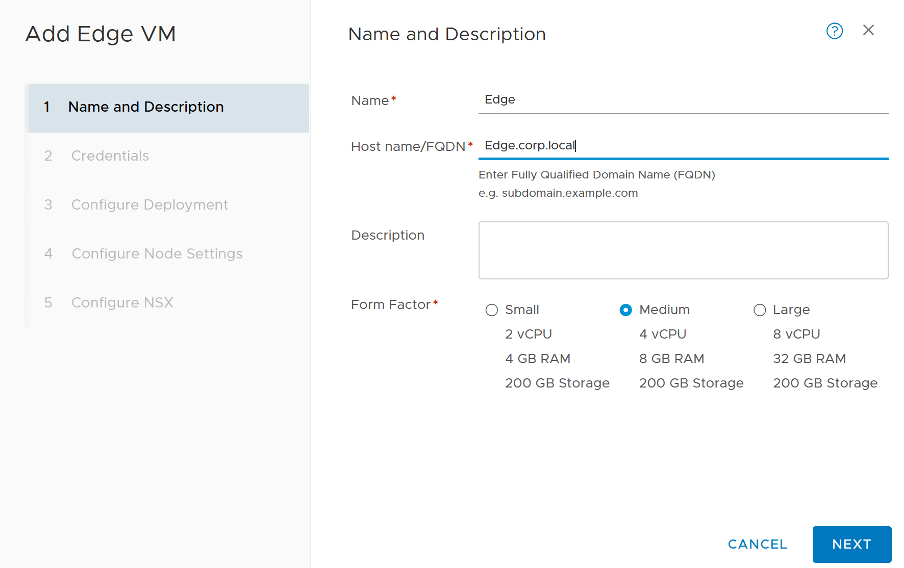


5. After you click on the finish wait for some time until the configuration state is “success” and “Node Status” is up for the newly deployed node.
6. Go to the Edge Cluster and replace the edge node with the new deployed node.

7. After the new edge node is successfully added to the Edge Cluster delete the old edge node from NSX-T UI.

Comments