Harbor Installation v2.5.4
- bansalreepa999
- Mar 17, 2023
- 2 min read
Updated: Jul 3, 2023
Below is the procedure for no Internet Access Environment. In my lab I deployed RHEL 7.9 VM downloaded from RHEL site. Before powering on the VM goto edit settings and add two new hard disks. It should look like below.

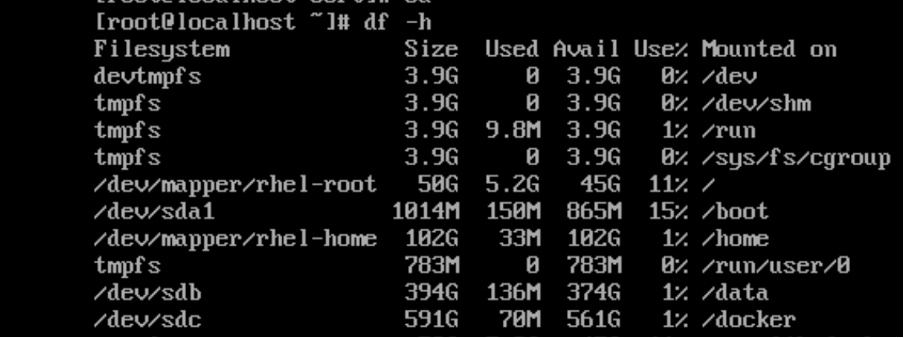
Now power on the VM and create two mount point /docker and /data like below. Filesystem size for /docker is 600GB and for /data is 400GB.
1. Run below RPMs in the same order and can be downloaded from below site.
yum install containerd.io-1.6.4-3.1.el7.x86_64.rpm yum install docker-ce-cli-20.10.9-3.el7.x86_64.rpm
docker-scan-plugin-0.9.0-3.el7.x86_64.rpm yum install docker-ce-rootless-extras-20.10.9-3.el7.x86_64.rpm
docker-ce-20.10.9-3.el7.x86_64.rpm yum install docker-compose-plugin-2.5.0-3.el7.x86_64.rpm
I installed centOS 7 RPM packages on my RHEL 7.9 VM and while installing it will ask for other RPMs like shown in below error message.

Other required RPMs are

You can download all the required packages from below link. Distribution selected should be CentOS 7.9.
Below is the command to run two rpms in one go.
rpm -i docpackage1.rpm package2.rpm
2. Download the Harbor offline installer from below link.
https://github.com/goharbor/harbor/tags?after=v2.6.2 and upload to the RHEL 7.9 VM using winscp tool or scp command. and run command tar xvf harbor-offline-installer-v2.5.4.tgz
systemctl restart docker
3. To configure https access(Certificates) to Harbor , follow the link
It is possible to deploy Harbor without security, so that you can connect to it over HTTP. However, using HTTP is acceptable only in air-gapped test or development environments that do not have a connection to the external internet. Using HTTP in environments that are not air-gapped exposes you to man-in-the-middle attacks. In production environments, always use HTTPS
4. Configure Harbor yml file.
cd harbor
cp harbor.yml.tmpl harbor.yml
Open the harbor.yml file in vim editor and update the hostname and certificate path.(/data/cert/*)
Run the below command
./install.sh --with-notary --with-trivy --with-chartmuseum
If the installation succeeds, you can open a browser to visit the Harbor interface at https://fqdn


Comments